Warning
You are looking at documentation for an older release. Not what you want? See the current release documentation.
Creating a new Content List template could be performed via three following ways:
Directly inline, via the Content Administration interface. This is the easiest and quickest way to create or edit Content List templates. This is really practical to quickly test your developments. See the List templates section for more details.
In your extension, via XML configuration files. This way is related to the configuration. You can see a sample of ACME site here.
Note
IDE is only available in the Enterprise edition of eXo Platform.
Creating a Content List template via XML configuration files
Assuming that you want to change the display of one ACME site part from two-column to three-column, you need to do as follows:
Create a CLV template named
ThreeColumns.gtmplundercustom-extension.war!/WEB-INF/conf/my-artifacts/content-list-viewer/list/with the following content.<%
import javax.jcr.Node;
import org.exoplatform.wcm.webui.paginator.UICustomizeablePaginator;
import org.exoplatform.wcm.webui.clv.UICLVPortlet;
import org.exoplatform.wcm.webui.Utils;
import org.exoplatform.services.wcm.core.NodeLocation;
%>
<div id="$uicomponent.id" class="ThreeColumnsCLVTemplate">
<div class="CLV">
<%
def header = uicomponent.getHeader();
def rssLink = uicomponent.getRssLink();
def isShowRssLink = uicomponent.isShowRssLink();
def isShowHeader = uicomponent.isShowField(UICLVPortlet.PREFERENCE_SHOW_HEADER) && header != null && header.trim().length() != 0;
%>
<div class="TopBoxHeader ClearFix">
<%
if (isShowHeader) {
%>
<div class="TitleBarL">
<div class="TitleBarR">
<div class="TitleBarM">
<%if (isShowRssLink) {
%><a class="RssIcon" onclick="javascript:window.open('$rssLink');" style="cursor:pointer" rel="tooltip" data-placement="bottom" title="<%= _ctx.appRes("UICLVPresentation.label.rssFeed") %>"> </a><%
}%>
$header
</div>
</div>
</div>
<%
}
%>
</div>
<%
if (uicomponent.getUIPageIterator().getAvailable() == 0) {
%>
<div style="height: 20px; text-align: center; font-size: 13px; background: white; padding: 10px; margin: 5px;">
<span><%= _ctx.appRes(uicomponent.getParent().getMessageKey()) %></span>
</div>
<%
} else {
%>
<div class="Contents">
<%
def currentPageData = uicomponent.getCurrentPageData();
for (def i = 0; i < currentPageData.size(); i++) {
def viewNode = currentPageData.get(i);
if(!Utils.isViewable(viewNode)) continue;
def isShowTitle = uicomponent.isShowField(UICLVPortlet.PREFERENCE_SHOW_TITLE);
def isShowDate = uicomponent.isShowField(UICLVPortlet.PREFERENCE_SHOW_DATE_CREATED);
def isShowLink = uicomponent.isShowField(UICLVPortlet.PREFERENCE_SHOW_LINK);
def isShowReadmore = uicomponent.isShowField(UICLVPortlet.PREFERENCE_SHOW_READMORE);
def itemLink = uicomponent.getURL(viewNode);
def itemDateCreated = uicomponent.getCreatedDate(viewNode);
def itemOwner = uicomponent.getAuthor(viewNode);
def imgSrc = uicomponent.getIllustrativeImage(viewNode);
def isShowImage = uicomponent.isShowField(UICLVPortlet.PREFERENCE_SHOW_ILLUSTRATION) && imgSrc != null;
def itemName = viewNode.getName();
def itemTitle = uicomponent.getTitle(viewNode);
if (itemTitle != null && itemTitle.trim().length() != 0)
itemName = itemTitle;
def itemSummary = uicomponent.getSummary(viewNode);
def itemSummaryField = uicomponent.getSummaryField(viewNode);
def isShowSummary = uicomponent.isShowField(UICLVPortlet.PREFERENCE_SHOW_SUMMARY) && itemSummary != null;
%>
<%=uicomponent.addQuickEditDiv("Column3", viewNode)%>
<%
if(isShowImage) {
%><a class="Image" rel="tooltip" data-placement="bottom" title="$itemName"><img alt="$itemName" rel="tooltip" data-placement="bottom" title="$itemName" src="$imgSrc" /></a><%
}
%>
<div class="Content">
<%
if (isShowTitle) {
if (isShowLink) {
%><div class="Title"><a href="$itemLink" rel="tooltip" data-placement="bottom" title="$itemName">$itemName</a></div><%
} else {
%><div class="Title">
<%
print uicomponent.getInlineEditingField(viewNode, "exo:title", itemName, "TEXT", "CLVTitle_"+String.valueOf(i), "GroovyCLVTitle", true, "button_direction=left-to-right");
%>
</div><%
}
}
if (isShowDate) {
%><div class="DateAndMail">$itemDateCreated by $itemOwner</div><%
}
if (isShowSummary) {
%><div class="Summary"> <%
if (itemSummaryField!=null) {
print uicomponent.getInlineEditingField(viewNode, itemSummaryField, itemSummary, "TEXTAREA", "Text_"+String.valueOf(i), "CLV2ColSummary", true, "height=80px");
}
%> </div><%
}
%>
</div>
<%
if (isShowReadmore) {
%><div class="LinkMore"><a href="$itemLink" rel="tooltip" data-placement="bottom" title="<%= _ctx.appRes("UICLVPresentation.label.readmore") %>"><%= _ctx.appRes("UICLVPresentation.label.readmore") %></a></div><%
}
%>
</div>
<% if ((i+1) % 2 == 0) { %>
<% } %>
<%
}
%>
<div class="CaptionFunc ClearFix">
<% String labelRefreshAction = _ctx.appRes("UICLVPresentation.action.refresh");
def isShowRefresh = uicomponent.isShowField(UICLVPortlet.PREFERENCE_SHOW_REFRESH_BUTTON);
if (isShowRefresh) {
String link = uicomponent.event("Refresh");
%>
<div class="CaptionRefresh">
<a href="$link" rel="tooltip" data-placement="bottom" title="$labelRefreshAction">$labelRefreshAction</a>
</div>
<%
}
if (uicomponent.showPaginator()) {
uicomponent.renderChild(UICustomizeablePaginator.class)
}
%>
</div>
</div> <%
}
%>
</div>
</div>Create
clv-templates-configuration.xmlundercustom-extension.war!/WEB-INF/conf/myacme-conf/wcm/, then declareThreeColumns.gtmplintoclv-templates-configuration.xml.<?xml version="1.0" encoding="ISO-8859-1"?>
<configuration
xmlns:xsi="http://www.w3.org/2001/XMLSchema-instance"
xsi:schemaLocation="http://www.exoplatform.org/xml/ns/kernel_1_2.xsd http://www.exoplatform.org/xml/ns/kernel_1_2.xsd"
xmlns="http://www.exoplatform.org/xml/ns/kernel_1_2.xsd">
<!-- Deploy template for Content List Viewer Portlet -->
<external-component-plugins>
<target-component>org.exoplatform.services.cms.views.ApplicationTemplateManagerService</target-component>
<component-plugin>
<name>clv.templates.plugin</name>
<set-method>addPlugin</set-method>
<type>org.exoplatform.services.cms.views.PortletTemplatePlugin</type>
<description>This plugin is used to import views templates for Content List Viewer</description>
<init-params>
<value-param>
<name>portletName</name>
<value>content-list-viewer</value>
</value-param>
<value-param>
<name>portlet.template.path</name>
<value>war:/conf/my-artifacts/content-list-viewer</value>
</value-param>
<object-param>
<name>Three columns CLV template</name>
<description>Three columns CLV template</description>
<object type="org.exoplatform.services.cms.views.PortletTemplatePlugin$PortletTemplateConfig">
<field name="title">
<string>Three Columns</string>
</field>
<field name="templateName">
<string>ThreeColumns.gtmpl</string>
</field>
<field name="category">
<string>list</string>
</field>
</object>
</object-param>
</init-params>
</component-plugin>
</external-component-plugins>
</configuration>
See the explanation about init-params in the Portlet Template section.
Register
clv-templates-configuration.xmlintocustom-extension.war!/WEB-INF/conf/configuration.xml.<import>war:/conf/myacme-conf/wcm/clv-templates-configuration.xml</import>
Create
pages.xml, which sets the pre-set display of the ACME site, undercustom-extension.war!/WEB-INF/conf/myacme-conf/portal/acme/. The newpages.xmloverrides configuration of the ACME site.Next, change
TwoColumns.gtmplintoThreeColumns.gtmpl.<preference>
<name>formViewTemplatePath</name>
<value>/exo:ecm/views/templates/content-list-viewer/list/ThreeColumns.gtmpl</value>
<read-only>false</read-only>
</preference>
Create
DefaultStylesheet.cssundercustom-extension.war!/templates/skin/acmewith the following content:.ThreeColumnsCLVTemplate .Contents .Column3 {
float: left;
width: 31%;
margin: 0 10px 10px 0;
padding: 0;
}
.ThreeColumnsCLVTemplate .CLV {
border:1px solid transparent;
-moz-border-radius-topleft:0px;
-moz-border-radius-topright:0px;
}
.ThreeColumnsCLVTemplate .Contents .Column3 {
margin-right: 10px;
padding: 0 0 10px;
}
.UITableColumnContainer .UITableColumnContainer .Column3,.UITableColumnContainer .ThreeColumnsCLVTemplate .CLV {
_border:none;
}
.ThreeColumnsCLVTemplate .CLV {
padding: 13px 10px 0;
-moz-border-radius-topleft: 5px;
-webkit-border-top-left-radius: 5px;
-moz-border-radius-topright: 5px;
-webkit-border-top-right-radius: 5px;
}
.ThreeColumnsCLVTemplate .TitleBarM {
color: #2D4396;
font-size: 14px;
font-weight: bold;
}
.ThreeColumnsCLVTemplate .Contents {
padding-top: 10px;
}
.ThreeColumnsCLVTemplate .Contents .Column2 {
float: left;
width: 48%;
margin: 0 10px 10px 0;
padding: 0;
}
.ThreeColumnsCLVTemplate .Contents .Image {
display: block;
float: left;
}
.ThreeColumnsCLVTemplate .Contents .Image img {
width: 48px;
}
.ThreeColumnsCLVTemplate .Contents .Content {
padding: 0px 0px 0px 60px;
color: #5a5a5a;
line-height: 14px;
}
.ThreeColumnsCLVTemplate .Contents .Content .Title {
font-size: 12px;
font-weight: bold;
}
.ThreeColumnsCLVTemplate .Contents .Content .Title a {
color: #5a5a5a;
}
.ThreeColumnsCLVTemplate .Contents .LinkMore {
text-align: right;
padding: 5px 5px 0px 0px;
display: none;
}
.ThreeColumnsCLVTemplate .Contents .LinkMore a {
color: #f58220;
text-decoration: none;
}
.ThreeColumnsCLVTemplate .Contents .LinkMore a:hover {
text-decoration: underline;
}Register the newly created CSS in the above step for the Default skin which is currently used in the ACME site by adding the following module to
gatein-resources.xml.<portal-skin>
<skin-name>Default</skin-name>
<skin-module>myacme-css</skin-module>
<css-path>/templates/skin/acme/DefaultStylesheet.css</css-path>
</portal-skin>
Restart the server, then go to the homepage of ACME site and switch to the Edit mode by clicking → on the top navigation bar.
Hover your cursor over the top of the list of news and click
 , then select "ThreeColumns.gtmpl" from the list of templates, then click .
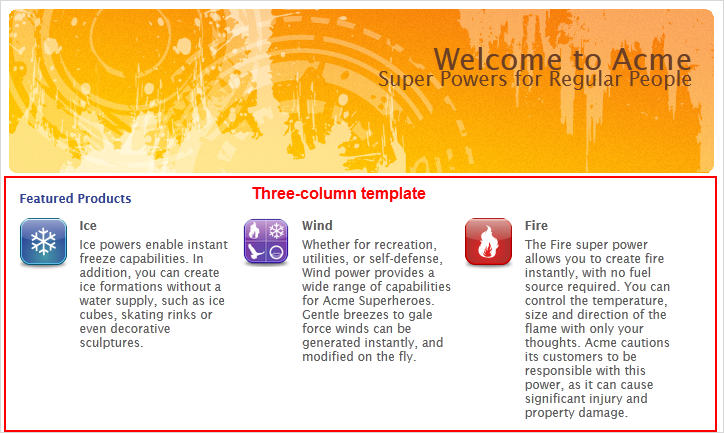
The ACME site is now displayed in the three-column template as below.
Creating a Content List template using IDE
Before doing the following steps, be sure that you are connected to a user who belongs to the /Developer group. The root user can be used for the simplicity reason.
Access IDE by clicking
 → .
→ .
Switch to the dms-system workspace by clicking → from the IDE menu. Next, select the dms-system location in the dialog box and click .
Navigate to the template location from the file structure on the left:
/exo:ecm/views/templates/content-list-viewer/list/.Create a new template by clicking → → from the IDE menu.
Save the file as "
ThreeColumns.gtmpl".Enter some basic codes:
<h1>This is my template</h1>
The date is <= new Date()>
Save the template.